Quantcast
Latest Stories
Before THX: The Cinema Shaking Technology of Sensurround

Recently, we’ve seen some buzz about Dolby Atmos, a relatively new movie theater sound technology that gives the illusion that there are an infinite number of audio speakers and channels surrounding the audience. It’s hard to believe we didn’t even have wide-spread Dolby Stereo in movies until Star Wars, and if theaters wanted to play Lucas’s space opera, they had to redo their sound system, or Fox wouldn’t give them the film reels.

Several years prior to Dolby Stereo, studios also experimented with a short-lived experiment in movie sound that’s fun to look back on today: Sensurround. It was a gimmick of its time, because the era of the all-star disaster film was in full swing, and while Sensurround wasn’t as high tech as Lucasfilm's THX or Dolby's Atmos, it did try to make movies feel bigger and more realistic through the sheer power of sound, and perhaps helped pave the way for today’s cinema audio technology.

Photo credit: Flickr user hijukal via Creative Commons.

Sensurround was the brainchild of the late Jennings Lang, a Hollywood producer who knew the power of showmanship. Lang was one of the first to call a film an “event” back in 1974 for Earthquake, and legend has it the idea for the film was based on a true event. Lang was in a movie theater when a real life earthquake happened. Then Lang got the idea about making a disaster film where an earthshaker hits L.A., and it would somehow shake the hell out of the audience as well.

“My dad was one of the last true showmen,” says his son, Rocky Lang. “He realized that movies had to be bigger and more event oriented. He was always trying to find a way to make the movie going experience bigger and better.”

"ATTENTION! This motion picture will be shown in the startling new multi-dimension of Sensurround. Please be aware that you will feel as well as see and hear realistic effects such as might be experienced in an actual earthquake. The management assumes no responsibility for the physical or emotional reactions of the individual viewer."- Theater Notice For Earthquake (1974)

By setting up a series of speakers in the theater, and running a soundtrack with very low tones, an earthquake simulation could be done, and there were cues on the Earthquake soundtrack when the special speakers were to be triggered.

How Music Affects The Mind's Perception

"Your brain is not a video camera," writes Vice, in an article that describes something seemingly impossible: Music affecting how our brains perceive the world. This is not about a perspective or point-of-view--it's about how music can actually create a motion aftereffect in our perception. What we see is fundamentally different from reality.

Motion aftereffects are common without a musical element. Stare at this animated waterfall, for example, and when the image shifts, your brain will still see motion when it isn't there. But the idea of music affecting our perception is far more interesting, because it shows how tangled our sensory processes are.

Photo credit: Flickr user Maxime Gendre via Creative Commons.

"[Pascal] Wallisch and colleagues are the first to report a disruption in people’s judgment of visual motion from listening to music," writes Vice. "The experiment was simple. Participants listened through headphones to ascending and descending piano scales for sixty seconds. Then they had to judge the direction of moving dots on a computer screen. The authors found that subjects who listened to scales that moved “up” the piano perceived the dots to move down. Those who listened to scales that moved “down” perceived the dots to move up."

Wallisch furthers his statement, that the world we perceive is hardly concrete reality, by pointing out that the retina is a 2D surface, and our 3D perception is actually created by how the brain infers information. "Put differently," writes Vice, "not only is the brain not a video camera, the audio feed is not even independent of the visual feed. It is inherently tangled up. Already on the frontend. In most cases, this is beneficial to disambiguate the world. We are simply taking advantage of this in this experiment.”

Listening to jazz, which is structurally complicated, may do more to affect your cognition than pop music.

The article digs beyond how music affects perception into how music actually affects the way we think. Listening to one type of music or another isn't going to completely define your personality, but listening to jazz, which is structurally complicated, may do more to affect your cognition than pop music.

When you think about our cultural understanding of music and how deeply it's integrated with our visual processing, the motion aftereffect makes sense. Vice writes that it's"elicited by confusion between your brain’s audio and visual feeds" and how we perceive musical scales. We associate "up" with ascending scales and "down" with descending scales (even though those keys are actually arranged from left to right on a keyboard).

Wallisch speculates that tribes who haven't been exposed to this musical form won't experience the same aftereffect. Sounds like the basis for an even more interesting experiment.

Engineer Plans to Build 3D Pizza Printer with NASA Grant

It should only take two words to sell you on the idea of 3D printed food: "Pizza printer." Back in February we wrote about how 3D printers could be used to create the space foods of the future. Cornell's Fab@Home printer is already on the way, as it's able to build simple foods out of hydrocolloids. Of course, we're still a long way from the Star Trek Replicator, but even NASA's paying attention to the prospect of 3D printed food. The organization recently handed a $125,000 Small Business Innovation Research grant to Anjan Contractor to continue developing his prototype universal food synthesizer.

Star Trek's Food Replicator

Contractor's vision for 3D printed food is currently centered around space applications, but his eventual goal is to eliminate food waste here on Earth. "He sees a day when every kitchen has a 3D printer, and the earth’s 12 billion people feed themselves customized, nutritionally-appropriate meals synthesized one layer at a time, from cartridges of powder and oils they buy at the corner grocery store," writes Quartz. "Contractor’s vision would mean the end of food waste, because the powder his system will use is shelf-stable for up to 30 years, so that each cartridge, whether it contains sugars, complex carbohydrates, protein or some other basic building block, would be fully exhausted before being returned to the store."

The Small Business Research Innovation grant, though, is for a 3D printer that could supply food to astronauts on long trips. The International Space Station would welcome a food printer, most likely, but trips away from Earth's orbit, like a lunar colony or an expedition to Mars, would obviously benefit more. Powdered nutrients with 30 year shelf lives would be enormously valuable to astronauts setting up permanent shop on Mars.

And then, of course, there's the the pizza printer. Quartz writes "Contractor’s 'pizza printer' is still at the conceptual stage, and he will begin building it within two weeks. It works by first 'printing' a layer of dough, which is baked at the same time it’s printed, by a heated plate at the bottom of the printer. Then it lays down a tomato base, 'which is also stored in a powdered form, and then mixed with water and oil,' says Contractor. Finally, the pizza is topped with the delicious-sounding 'protein layer, which could come from any source, including animals, milk or plants."

Contractor won his grant thanks to his prototype 3D chocolate printer, seen above. It's not the only 3D printer we've seen lay down some chocolate goodness layer-by-layer, but it's the first we've seen that may lead to a 3D pizza printer. Godspeed, Anjan Contractor.

Maker Faire 2013: Roy the Animatronic Robot

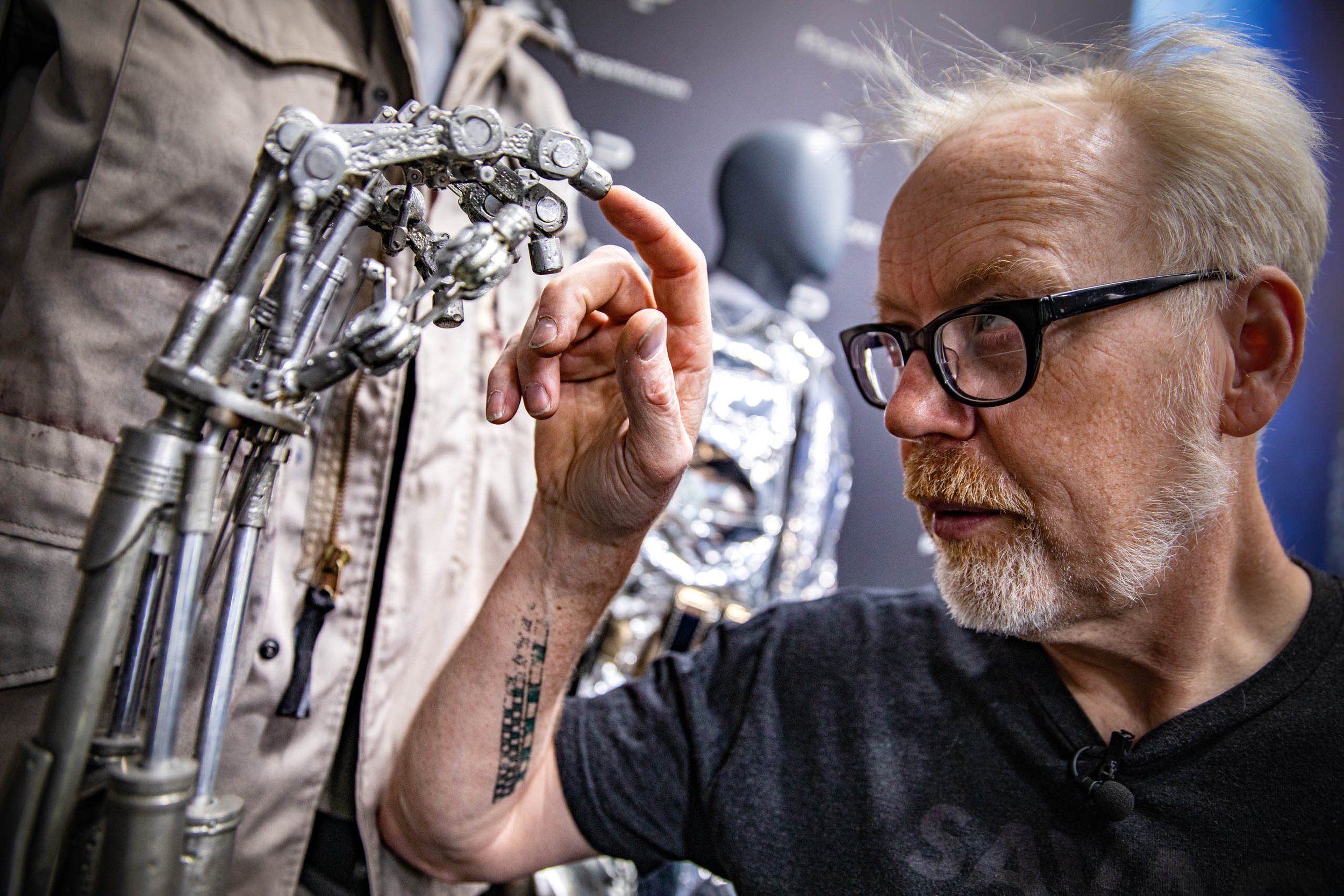
In 2012, Roy the Robot was one of the most eye-catching projects on exhibit in Maker Faire's expo hall. Half of Roy's draw came from his Terminator-like skeleton, with laser-cut wood standing in for shiny metal. He owed the rest of his appeal to a red Hawaiian shirt that Hunter S. Thompson and Bruce Campbell would've fought over. This year, the Hawaiian shirt hangs in the corner of Roy's booth, because he's no longer wearing it--he's got a brand new laser-cut chest to show off. 11 months after concluding a successful Kickstarter, maker Brian Roe is drawing a constant crowd to show off the new and improved Roy.

"At Maker Faire last year I had the arm and the hand and just the head, basically, the eyes and the jaw," says Roe, who's a mechanical engineer by day. "It was all mounted on a PVC frame kind of representing the shape of a human body, but nothing underneath the shirt. That's why he had a Hawaiian shirt on. I wanted to cover up all the PVC. This year I decided I really wanted to try to finish out the arms. So I got working on the arms, but then of course, if you're going to build the arms, they have to attach to something. So then you need the chest. Well, if I'm going to put the chest in there, I might as well do a cool neck because I've got the chest there to hook the neck to. So it got a little crazy. Now he sits with 48 servos, 16 servos in each arm. It's crazy. There's a ton of servos."

Roe started Roy as an animatronics project before Maker Faire 2012. The scale of the robot quickly spun out of control, but in a good way--Roe kept adding degrees of articulation, laser cutting parts in his home workshop, and suddenly his robot had a hand with individually servo-driven fingers. Roe launched a Kickstarter the first day of Maker Faire in 2012, offering Roy arm kits for backers to assemble, and eventually raised about $15,000--double his goal of $8,000.

There was enough money and interest in the project for Roy the Robot to grow even more complicated. But first, Roe had to deal with laser cutting some 10,000 parts for his backers.

Maker Faire 2013: The Open Clock Project

The expo hall of Maker Faire is packed with hundreds of projects. Some Makers are there to sell things they've built. Others are just there to show off something fun. Craig Bonsignore, maker of the Open Clock, had a slightly different motivation for his project: He hated his alarm clock, so he built one of his own as a completely open source project. And every component, from the 6.4-inch resistive touchscreen to the 512 LED red/green display, is available online.

"It's the maker thing. Something bugs you, you just make a better one," says Bonsignore. "The design criteria were: Easy to use, easy to see, intuitive. I don't sleep with my glasses on, so with my glasses off, arm's length, I can read the digits without squinting."

The Open Clock looks a little like the time-telling equivalent of one of those cheap calculators with oversized buttons, and its numbers are big enough to read from across a room. But it's hardly a simple project. In his quest to make the perfect alarm clock--or, at least, an alarm clock that he won't hate--Bonsignore has given the Open Clock a fun array of features.

The display is touch-controlled, so a simple tap will switch from displaying the time to displaying the date. Another tap can open up the menu and adjust the time, and tapping at the top or bottom of a digit increases or decreases the number (if you've ever had one of those alarm clocks that makes you press a button 24 times to cycle through every AM/PM hour, you probably love this idea already).

The clock is green during the day from 7 o'clock in the morning to 7 o'clock at night, when it turns red.

"The clock is green during the day from 7 o'clock in the morning to 7 o'clock at night, when it turns red. So it's intuitive that right now it's day time, it's 1:52, it's green," says Bonsignore. He gestures to the three different models of the Open Clock he has on display at Maker Faire. A rough plastic frame houses the earliest model. "This is the first one--it's been sitting on my nightstand for about a year. I've sort of refined it over time. I think I started it with green at night, but decided, hey--red, submarines, there's kind of a night vision thing--red is better. You actually have more receptors on your retina for green. Green is an exciting color, and red is a subdued color, so that kind of made sense...The brightness adjusts automatically so it doesn't bug you at night. I had to go through some iteration on that."

The second Open Clock model has a smoother black shell. The third is made from transparent plastic, which shows off the Arduino board and speaker inside the clock. The LED face on the transparent model is also noticeably brighter than the other two, which he explains:

Living with Photography: Ground as Background

I've been reading a lot more about composition since writing my last column, since it's such a complex topic that's not very easy to verbalize. This has me going through old photo libraries, looking at ones that catch my eye, and wondering why a particular photo stands out. For example, one photo I really liked from last year is from New York Maker Faire, of the competitors in the Power Racing Series. Staring at a favorite photo you've taken to scrutinize its composition can be a maddening exercise, but those illuminating moments when you discover something new make the effort very worthwhile. And one of the things I'm becoming more aware of is the use of the ground in photography.

In reading up on composition, I came across several articles about the work of legendary French photographer Henri Cartier-Bresson. Cartier-Bresson is well known as the father of photojournalism and street photography, and New York-based photographer Adam Marelli has written some excellent analyses of Cartier-Bresson's compositional techniques. Among those tricks he mastered was the Figure-to-Ground relationship, a concept practiced in painting. Not surprising, since Cartier-Bresson began his career as an oil painter before adopting photography.

Let's first define our terms. In thinking about the relationship between Figure and Ground, the Figure represents the subject of a photograph. This can be a person, an animal, or even a smartphone. It's the most important object in the photograph--everything else serves to accentuate it or call attention to it. And that "everything else" is what's referred to as the Ground. The Ground is defined as everything that's not the Figure (or Figures), and the compositional relationship between those elements is the magic sauce that makes a photo stand out. The Ground of a photograph, as you can surmise, is actually short for background--but not necessarily in the spatial sense, since technically your subject could be in the focus in the background of a scene.

But while the real world exists in three dimensions, a photographic image is flat. And in a two-dimensional plane, there is no "background" and "foreground" in the spatial sense. So when I look through a viewfinder to compose an image, my mind has to "flatten" the scene in front of me, much like the flattening layers of a Photoshop file into one single image. In photography and painting, the physical ground becomes the background.

I've created a simple diorama to illustrate this concept:

Everything You Should Know about Microsoft's Xbox One Console

Three months after Sony held a special event to announce the PlayStation 4, Microsoft responded with the announcement of the Xbox One. This is the follow-up to the Xbox 360, eight years down the road, and Microsoft's sticking with a familiar strategy: Dominate the living room. In the first 30 minutes of its Xbox One presentation, Microsoft focused more on the console's ability to switch seamlessly between live television, movies, music, and gaming than it did on games themselves. This is the definition of a do-everything box: in fact, Microsoft's combining its Windows 8 architecture and Xbox software into one unified experience.

Microsoft demonstrated that combination by showing off Windows 8's window snapping feature on the Xbox. While watching a movie, they brought up Skype on Xbox and snapped it to one side of the screen, allowing both movie and video chat to run simultaneously.

Through the first 30 minutes of its presentation, Microsoft quickly ran through the Xbox One's new hardware, new user interface, and new Xbox Live features. Everything has been changed and updated, including the Kinect and the controller. Thankfully, Wired has also taken a closer look at the Xbox One's hardware. Let's dig in.

My Sennheiser HD580s: Why Failing Predictably Can Be a Good Thing

The other day, I was talking to a friend about old tech we still use, and I realized I’d be hard pressed to find anything I’m still using that’s older than my studio headphones. I bought a pair of Sennheiser HD580s about ten years ago. They still sound great, but they’ve outlasted most of the other electronics I’ve purchased since then simply because the designers knew how they’d fail.

Most other headphones and earbuds I’ve had failed in exactly the same way—a cable gets damaged and the connection either breaks entirely or (worse) is sporadically noisy. Sure, it’s relatively easy to fix a broken wire, but the cable is never quite the same after you’re done—it’s thicker and is less flexible than an undamaged wire.

The good news for me is that I’ve never had to fix the cable on my HD580s, because they’re user-replaceable. At $25, the replacement cable is a fairly expensive part, but it takes a few seconds to replace the wires. And yes, the default cables are probably less sturdy than they should have been, but I’m happy to spend $25 every few years to avoid having to replace the headphones entirely. Over the last ten years, I’ve replaced the cables on my HD580s two or three times. The HD580’s foam parts, which tend to wear down over time, are user-replaceable too. They lasted longer than the cables, but I’ve replaced both when they wore out. The end result is that the headphones are just as comfortable and sound just as good today as they did when they were new.

I’ve probably clocked a few thousand hours on my HD580s over the last decade (including a couple of 24-hour marathons), and during that time I’ve killed a half-dozen pairs of earbuds. Everything from $20 generics to $125 Shures suffered my wrath. The only difference is that on the HD580s, I was able to replace the broken component. Unfortunately, since I bought these headphones, Sennheiser seems to have backed away from user-replaceable parts, at least for headphones in the $100-150 price range. Sennheiser’s much-more-expensive studio headphones still have user replaceable parts, but the more affordable HD5xx series doesn’t. It seems like the rest of the industry has followed suit. While The Wirecutter’s favorite sub-$150 headphones feature user-replaceable cups, the cord is a permanent fixture. Most of the other headphones in their roundup featured permanent cords.

Because the designers who built the HD580s knew where they’d fail and where they’d wear out, they made those components easily replaceable. There's a fine balance between planning well for failure and a planned obsolescence that results in a forced upgrade cycle. However, if the end result is that I can easily fix things that break due to normal wear and tear without having to replace them, I'm happy to keep using my HD580s for the foreseeable future—until they either break beyond my ability to fix or I can no longer buy replacement parts for them.

Disneyland's Future Robots Could Grab Your Bags

Disney's Research arm just released a video showing a project to design humanoid robots that can participate in a natural interaction with a human. In this case, that interaction is the passing of an object, such as a bottle or a bag, between the human and the robot. But that's not as easy as it sounds. The robot has to anticipate an object about to be passed and adapt its motion while observing the human and tapping into a human motion database to make the exchange as natural as possible. To test the effectiveness of its project, the researchers conducted experiments that "teased" the robot, though I'm sure no name calling was involved.